• Home
  • About Us
  • Services
  • See Our Work
  • Buy Our Book
  • Free ebooks
  • Contact
  • Blog
Menu

Pictures and Stories

Street Address
Salt Lake City, Utah
801.906.0609
your life. in a book.™

Pictures and Stories

  • Home
  • About Us
  • Services
  • See Our Work
  • Buy Our Book
  • Free ebooks
  • Contact
  • Blog

The easy way to print a contact sheet of photos in Windows

February 24, 2014 Alison Taylor
Here's an easy way to print a contact sheet (or index print) of photos without any special software.

Here's an easy way to print a contact sheet (or index print) of photos without any special software.

Have you ever thought how handy it would be to have a printout of itty-bitty pictures, with their filenames, of all the photos in a particular file? Photographers call them "contact sheets;" the ones you get with your photo prints from Costco are called "index prints.

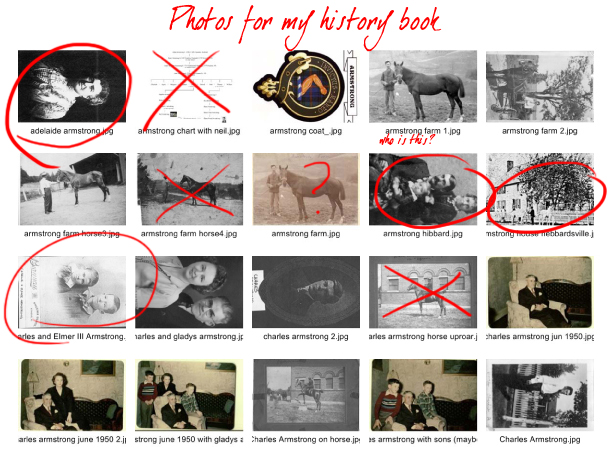
Whatever you call them, contact sheets can be a big help in keeping track of what photos to use in a life story or family history book/project. Even though I have my photos pretty well organized on my computer, I like to have stuff on a piece of paper I can scribble on.

It’s easy, and you don’t need any special photo software. Here’s how to print a “contact sheet” in Windows 7: (see update for Windows 10 at bottom of post)

  1. Open the Pictures library by clicking the Start button and then clicking Pictures. Navigate to the place where the pictures are that you want to print and open the folder.
  2. Click the pictures you want to print as thumbnails. (To select more than one, hold down the Ctrl key as you click, or you can select a range of photos by shift-clicking.)
  3. On the toolbar, click Print.
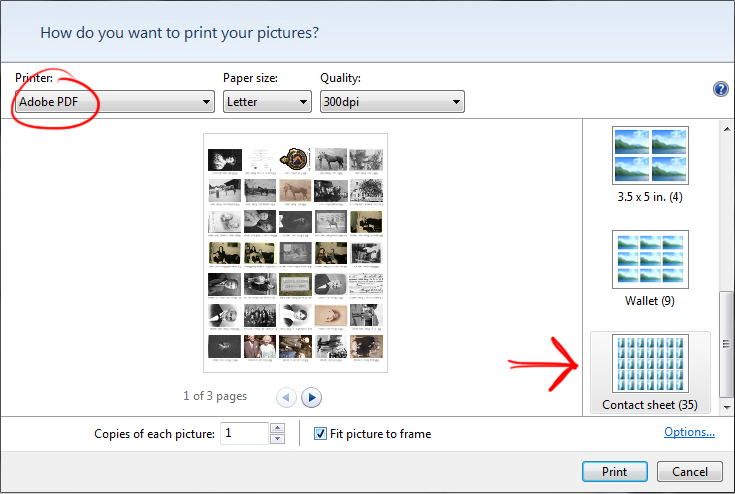
  4. In the Print Pictures dialog box, select the printer, paper size and type, and the number of copies you want to print, and then click Contact sheet in the list of print sizes. You can also print to a PDF file.
  5. Click Print to start printing.
index print window.jpg

As you can see from the top photo, the only hitch is that you’ll have to look at your vertical photos sideways. If this bothers you, you can find more sophisticated options for printing a contact sheet in Photoshop or Lightroom or other photo organization software. But the Windows option is handy when you don’t want to go to the trouble of opening up a whole other software program.

If you are on a Mac, I’m told you can do this from Quick Look in Leopard, but it has a couple of extra steps. If you have found a slick way to do this on a Mac, let me know and I’ll pass it along.

UPDATE FOR WINDOWS 10: 

From My Computer, navigate to the photos you want to print in a contact sheet and select them. With the photos selected, right click, choose "Print," and follow the directions in the graphic above. (The Photos app in Windows 10 does not allow printing.) 

In pictures
← How I Made a Life Story Book in a Weekend - TomHave you seen this?! Cool new genealogy charting tool - Puzilla →
Subscribe to Our Newsletter
See samples of our book by clicking on the cover photo.

See samples of our book by clicking on the cover photo.

Topics

Archive

  • 2016
    • Oct 31, 2016 3 Steps to Writing a Story About Your Life

HERE'S OUR INSTAGRAM FEED

Thanks, London, for making us feel so welcome. We'll see you again someday. #epicfamilyhistorytour #rootstechlondon
Oxford, vertical edition. As much vertical as Instagram will allow, anyway. #theylookbetteronfacebook #epicfamilyhistorytour #rootstechlondon
A beautiful fall day at Oxford, landscape edition. #epicfamilyhistorytour #rootstechlondon
Final day at #rootstechlondon, then rush to the V & A for the last hour before it closes! Then a walk across the Millennium Bridge for a glimpse of the Globe and the city at night, plus a beautiful poetry/video art installation, projected onto St
Long, fun day at #rootstechlondon! 4 presentations down, one to go... Celebrated with dinner at a 500-yr-old pub where Dickens used to hang and which is now owned by Gandalf. #epicfamilyhistorytour
We're here! Tom's up first today, with "Capturing Family Stories in Video Clips" at 14:00. I'm here early to attend the first class, I'm so excited. What a great conclusion to our #epicfamilyhistorytour ! #rootstechlondon #picturesandstorie
Hello, London! So excited for Rootstech. #epicfamilyhistorytour #rootstechlondon #picturesandstories #yourlifeinabook
Our host showed us these amazing travel scrapbooks his mother made in the 1930s and '40s, complete with hand drawn maps and illustrations. We will miss this place! London, here we come...
Featured
RootsTech 2025
Mar 3, 2025
RootsTech 2025
Mar 3, 2025
Mar 3, 2025
Speaking at RootsTech 2024
Feb 28, 2024
Speaking at RootsTech 2024
Feb 28, 2024

We are so excited to be back at RootsTech live this year! Come by and see the Pictures and Stories booth (#1609) and see some of the many new books we’ve helped our clients create. Alison is giving two in-person classes: The Seven Deadly Sins of Building a Digital Archive, and Making a Genealogy Story Book. Hope to see you there!

Feb 28, 2024

Copyright 2018 Pictures and Stories, Inc.